What Is Domain Registration and Web Hosting?

How Much Should I Pay For This?

If you’re looking at starting a website for the first time, or you’re comparing options for an ongoing website, you probably have heard terms like Domain Registration and Web Hosting without understanding what they really mean. We work with a lot of website owners and this topic comes up fairly often. It’s safe to say that many people get these terms confused or have some misconceptions. 

We’ve created this article to help clear a few things up. By the end of this article, you will have a much better understanding of Web Hosting, Domain Registration, and DNS.

Two quick items before we begin:

1:  You can find a full glossary of the terms we’re using here at the bottom of this page. [Click Here] to jump to that section now.


2:  We will often use example.com as a way to talk about a website or domain. That’s because that doesn’t go to a “real” website. But we might also use other generic sounding names as placeholders (John Smith, ACME Corporation). These are meant to be used as placeholders for educational purposes only. In some cases you will see yourbusiness(dot)com. Writing it out like this prevents the text from becoming an clickable link. 

Domain Names - What’s in a name?

What-does-DNS-stand-for

Let's start with what it means to register a domain name. We all know the URL for Google is www.Google.com, but did you know that this is just a convenient way to remember their actual IP address, which is: 172.217.19.164
Side Note: We slowly stopped using the “www” around the 2010’s because it’s not really necessary. Modern browsers know what you mean. 

What’s an IP Address?
Much like phone numbers, computers use a series of numbers to connect with each other around the world. These numbers, called an IP address look something like this: 192.0.2.255. Not as catchy as yourbusiness.com, which is why you register the Domain Name with ICANN (Internet Corporation for Assigned Names and Numbers). Think of it like saving people's phone numbers as contacts under their name. 

The Domain Name System (DNS) handles the conversion from the IP address into a Domain Name that can easily be remembered.  The result is that all traffic to yourbusiness.com will connect to the computer that uses 192.0.2.255. That computer is called a Server because it’s always on (“99.9% Uptime”) and ready to serve the data it’s holding to anyone that connects to it. 

This is similar to the way that you are the only one with your unique phone number, so nobody else will get your calls. The only difference here is that more than one server can host your website. This is called a CDN and it means that 7 different data centers around the world might hold your website’s data. When someone clicks on your link, they will be routed to the datacenter (and sever) that gives them the fastest connection. If you ever lived in a house with a land-line that had multiple phones, you will remember that they all ring when a call comes in, but you only pick up the phone closest to you. So a CDN works like that, but we’re getting off track… 

How Much Does It Cost To Register My Domain Name?

The short answer to this is that it costs around $15-$20/year on average to register a domain name.

That said, you can often find package deals when signing up for a new hosting package that will include 1 free year of domain registration. Or you will see a promotional price for the first year and then a renewal rate for the subsequent years.

Can I register a Domain get Hosting from different companies?
Yes and many people do this to save on costs. However, if the amount of money you are saving is around $5/year, we recommend using the same provider for your hosting and domain registration.

This type of package deal can save you time and inconvenience by giving you a single dashboard to log into. Having both services “under one roof” is also very nice when you need to do troubleshooting or contact the tech support team. If you’ve ever gotten the run around from a tech support where they say “Oh, it’s the problem from the other provider. You need to contact them”.... Well let’s just say that it’s nice when they are both providers and that’s easily worth a few dollars per year. 

The-price-of-Domain-Registration

What’s the difference between a dot.com, dot.org, dot.net, dot.gov?

Maximus-Marketing-Word-Cloud-of-TDLs

These are called Top Level Domains (TDL’s) and new ones get released by ICANN every year. Most of these have no practical difference other than cost. Traditionally, TDL's like dot-org were associated with non-profits or other organizations, but there is no requirement to verify their status as such.

Some of the latest TDL's for 2026 include: .art.shop.eth, and .dao, as well as general-purpose ones like .fast.talk, and .you. These are just an example of the nearly 1600 TDL's that have been made available at the time this was written.

There are some notable exceptions to this such as the Dot-Gov TDL which is reserved for official (US) government related websites. Entities that work within the government can request a .gov domain and if approved by CISA, they will be provided this domain at no cost. If you think you qualify for a .gov, we can help you apply for, and manage your .gov website.

What Exactly Is Web Hosting?

If we follow our phone analogy, a hosting company is like your phone carrier. Verizon, AT&T, T-Mobile all offer the same basic services. Much like Web Hosting companies, phone carriers all have different packages at different price points aimed at anticipating your needs or budget.

In short, you pay a hosting company to ensure that your website is accessible anytime of the day from anywhere in the world. In theory, you could host your own website if your computer was configured to act as an incoming server and was never going to turn off. Of course if you want the loading speed of your website to be fast and reliable (and trust us, you do!), then you should be prepared to invest a lot of money in a server to host your own website.

The reality is that most of us would rather pay somewhere between $3-$30 per month for someone else to host our website and cover the costs of the physical investments like advanced servers, as well as the troubleshooting, and cyber security that goes with professional web hosting. 


Web-Hosting-is-how-your-website-is-always-online

What if I just want my own email, but I don’t need a website?

Hosting-Providers-use-large-servers-to-connect-you-to-the-website

This is called Email Hosting and many providers out there that offer this as a "specialized" or "unbundled" service. So while this use case is less common, it's entirely possible.

When is this a practical solution?
This is common for solopreneurs and startups. People want to be taken seriously, so having John-Acme-Corp@gmail for your email address looks much less professional than John@acme-corp(dot)com.

In general it’s ideal to have an official looking email. It makes you look more established and trustworthy. While having an email domain without a website can be a good first step and save startup costs, there are some Cons associated with this approach.

Most users will see an email address such as You@example.com and assume that there is a website that goes with this domain. It’s pretty common for someone trying to verify you and your business to copy the domain part of an email address and paste it into google (or a browser’s URL field).  That’s why many people also include a link to their website as part of their standard email signature along with a phone number. This saves people time and encourages them to check out your web presence.

In some cases, although less common, larger companies will have one domain set up for their website, but their official email addresses coming from a slightly different domain address. They often set up a redirect function that helps traffic reach their official website from either of those URLs. So when you see an email from John@acme-corp(dot)com and the company’s official website is Acme(dot)com, both of those URL’s will direct your browser to the correct website.  (These examples are REAL websites. However we are only using them as examples and have no affiliation with the companies that own them)

How much does it cost to host a website?

Now we are getting into the reason that most of you are reading this. We wish we could give a straightforward one-size-fits-all answer to this, but it’s a bit difficult. The variety of plans and products offered by the multitude of hosting providers makes it challenging to compare Apples-To-Apples, and it changes from month-to-month as plans and promotions change.

Here’s What We Can Tell You:
First you need to decide if you’re looking for a ‘self-hosted’ platform to create a custom website on a CMS like WordPress (WP) — Or if you want to pay for a premium service that provides you with a few options and a selection of templates that are written on proprietary code, like Wix and Squarespace

In most cases we recommend the more versatile and popular option of building a website within WordPress. We do this because it’s more affordable, has limitless possibilities, and you can move your website to a new host if you’re no longer happy with your current host. This is similar to our cell phone analogy where you can change carriers, but keep the same number.

Introductory Promotions - Getting The Best Bang For Your Buck!
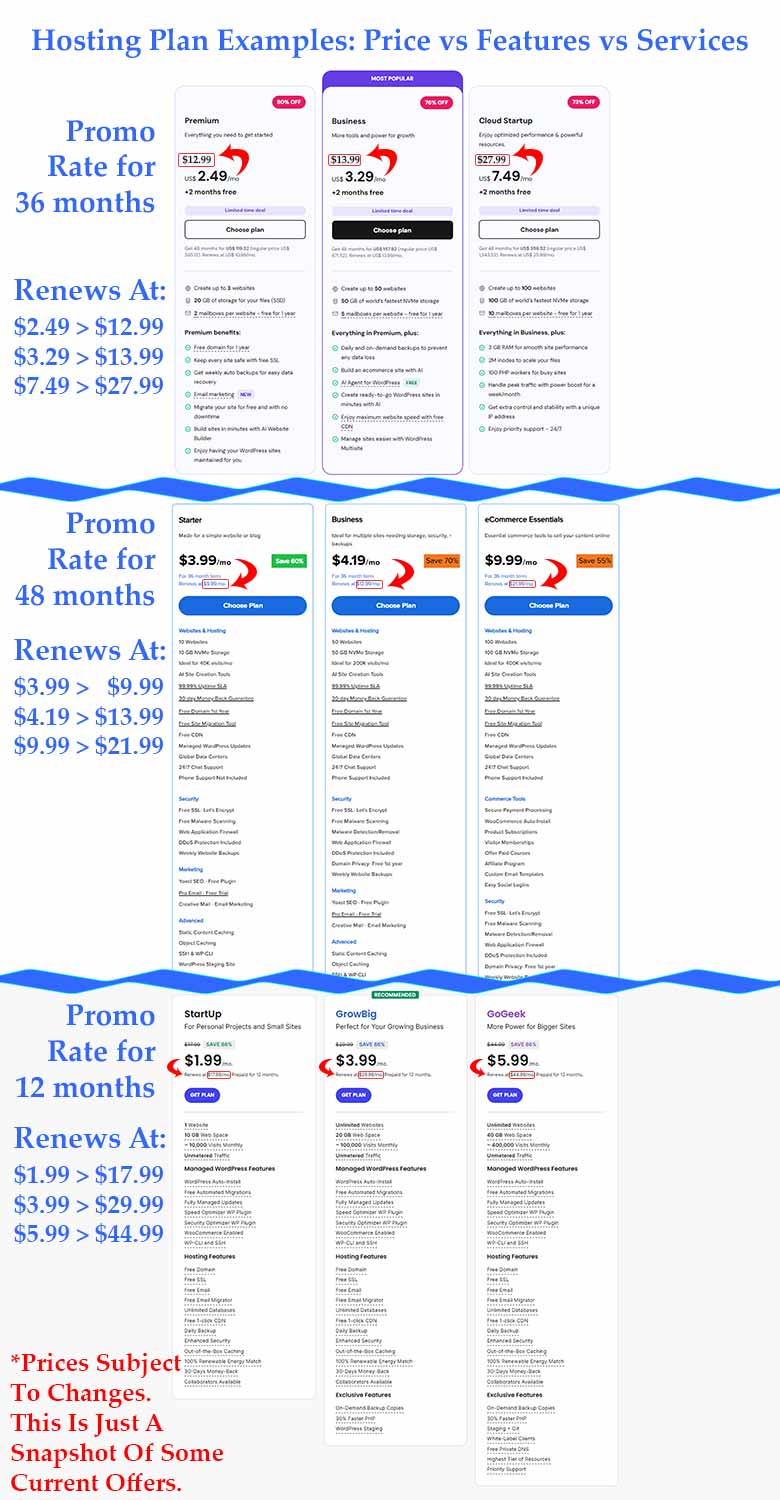
Most hosts will have plans available with a low monthly introductory price of $3-5 per month. The catch is that you need to pay for 12-24-36-48 months in advance. This is a good thing because you lock in that promo price for as long as possible. While you might have an upfront cost of $145 for 4 years of hosting, it’s really smart to lock in that $3/month for as long as possible, unless you only need a temporary website for some reason.

When the plan renews, you will likely be paying anywhere from $10-25 per month and renewing for a 1 to 3 year period.

Shared Hosting, Dedicated Hosting, Or VPS?

The rates above are for Shared Hosting, which is the most common service for small businesses, solopreneurs, and startups. You might see other options like VPS (Virtual Private Server) and Dedicated Servers, but these are for larger operations with specific needs. Naturally they will cost a good deal more than Shared Hosting. For most small to medium businesses, shared hosting plans make the most sense.

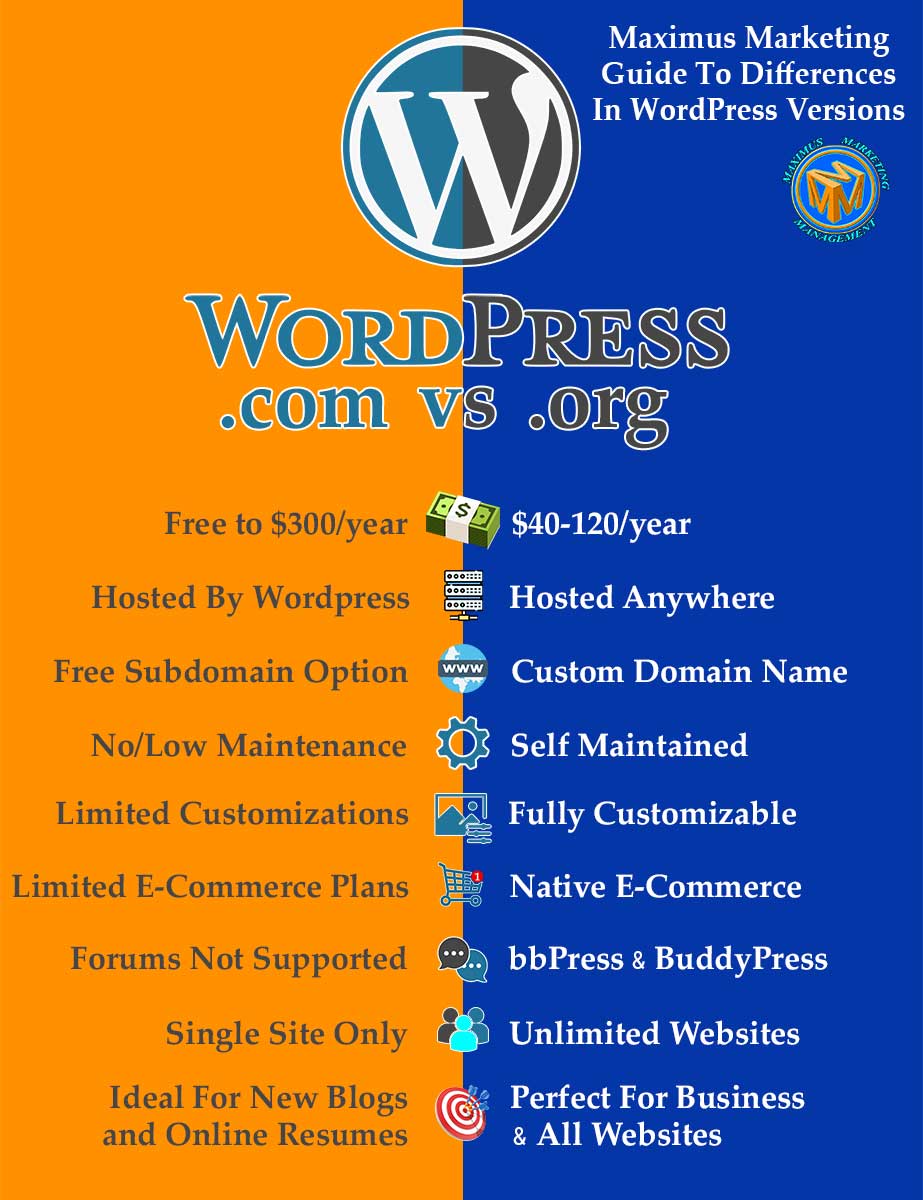
Wordpress.org or Wordpress.com?

To clarify one point:  When referring to Wordpress, we are talking about using WordPress.org as a Content Management System (CMS) and not WordPress.com, which is a separate service that we don’t recommend for most website owners. Like Wix, Squarespace, (and Godaddy’s website builder), these wordpress.com sites are built on non-editable proprietary code that seriously limit what you can do.

Both specialize in making it easy for a non technical person to build a basic website in as little as a few days. That said, the WP.com options are more limited and the results are underwhelming in many regards. While their “free” sites (which are really just a sub-domain) might be OK for casual blogs or an online resume, their paid plans aren’t worth the premium subscriptions in our opinion. Like Wix and Squarespace, this remains a popular choice and has name recognition due to their massive marketing campaigns.

We’ve worked with several clients that had already chosen to go with one of these one-stop-shop host & build providers, and they can work for some if just you’re starting out, we recommend a self-hosted website with Wordpress.org as the framework (CMS). If you’re going to build something, it’s better to start with a solid foundation that doesn’t limit your growth. 

Comparing Plans - The devil is in the details!

Maximus-Marketing-Guide-To-Web-Hosting-Comparisons

As mentioned, what makes it hard to compare one host's plan to another is the variety of services and products that they include in their different tiered plans. 

You can look at the plans and try to find one that offers the features you need at a rate that fits your budget. That part is pretty straightforward. What is harder to quantify, and can even change after you sign up, is the level of service and support that backs up their hosting services. 

Regardless of which host you work with, some settings and controls are off limits to you as the customer. Also, some hosts give you access to cPanel (a standardized interface that developers have used for a long time), while other hosting providers will have a proprietary admin menu that can change over time. 

Depending on what you are trying to do, you will most likely need help in the form of support from the host eventually. Some hosts give you the ability to call the support team on the phone or resolve issues over a live chat. This type of support can be worth every penny when you actually need it, though hopefully that is a rare event.

Much like the “no frills” experience of a low cost airline, the low cost web hosting companies (or even the lowest tier at some hosts) are looking for ways to cut costs. This often translates to slow or inadequate customer service. Imagine having your website down and waiting hours or even days to get an email back from the support team? This could be costing you leads and sales as well as hurting your professional reputation.

This scenario might not happen very often, but if you have to pay your web admin / webmaster to resolve these things for you, because the hosts support system is not user friendly, those costs can also add up.

Key Takeaways for Web Hosting

This is our best general advice: 

  • Know what features you need and avoid the upsell and bundles that don’t make sense for your use case.
  • Compare similar features and packages from several different hosting providers. Beyond that, spend some time looking at what other users say about that host and consider how recent those comments are. There are many good subreddit groups with posts comparing different hosts, or how a host is doing now compared to the past. However, take online reviews with a grain of salt because every user’s setup and expectations are different from yours. 


Some key features to compare might also include:

  • Email - Does the hosting pack include 1, 2, 5, Unlimited email addresses?
  • cPanel access, FTP / SSH access, or proprietary admin panel? (cPanel & FTP are preferable)
  • Storage Size - For single websites with only a few pages, 10 GB  is more than enough. (You probably won’t even use 2 GB) 


Promotions & Features: - Common things to look for:
 

  • 1 year of domain name registration for free
  • Low price for 36 or 48 months (before renewal)
  • Free SSL certificate (pretty standard now)
  • Routine Backups - IE Daily, Weekly, Monthly?
  • Free CDN (Content Delivery Network) = Faster load speeds
  • DDoS protection and malware scanning for cyber security
  • Malware scanner to keep malicious code out of your site’s root directory
  • 24/7 Support, or “priority support” - It’s nice to have
  • WhoIs Domain Privacy (usually an UpSell) - Keeps your name, address, phone unlisted. But if you list it on your site anyway, then what’s the point?


Bundles with bloat, fluff, and useless features (In our opinion)

  • AI website builder - Likely to disappoint most users
  • Templates - You can find free templates from many sources
  • AI tools in general (text writer, image gen, seo tools) - In most cases will not live up to the hype. In our experience they’re “meh” at best, and often produce results that are disappointing or even laughable. 
  • “Marketing tools” is a generic term for things that most people won’t use. There are better options from many other places. 
  • Email Marketing - The same as above.
Maximus-Marketing-Web-Hosting-Plan-Comparison

How Do I Pick The Right Plan For My Website?

How-to-pick-the-right-hosting-plan

If you’ve been comparing plans from some of the popular web hosts with a good reputation, but are stuck when it comes to picking a provider and plan, here’s our advice…

Take a deep breath! You’re not alone in feeling this way. These feelings of anxiety over this choice are made worse, it seems when these hosts have banners that claim a “Big Sale” which ends in a matter of hours/days. In our experience that’s usually a gimmick. Another sale will probably start right after that one ends in some never-ending sale tactic. 

Likewise, you should try to narrow in on the key points that are most important to your use case and try to ignore the “fluff” that is listed in many of the plans. Consider factors like if free email is included in the plans you are considering, or if they offer things like regular backups, malware scanning, and other security features. 

If finding a low cost provider is of the most importance, compare the plans that will not only start out low, but renew at a lower rate after the initial period. Be sure to lock in that initial rate for as long as you can. 

If you’re planning to host multiple sites, you can focus on plans that offer that flexibility. With this in mind be sure that you really need that expanded capacity right away. Most providers are happy to let you upgrade later on. 

If things like reliability (aka “uptime”) is critical, you should be prepared to do a little research into the real world reports of the hosting providers that you’re considering. Most will claim that they have “99.9% Uptime”, but any amount of time that your website or web app is down can be a loss of revenue and customer trust in your brand. 

Server speed is another consideration. While you can optimize your site to load faster and use a CDN or caching plugins, the actual load speed of your site can be bottlenecked by the physical hardware that the hosting provider is running on their servers. It’s prudent to do some research on this topic as well.


It’s OK to Ask For Help!

Once you’ve done your research and still feel uncertain, that’s completely normal. This is where a second opinion can really help. If you're already working with a web developer or you know of one, ask for some help in choosing a good plan for you. Most people in this space have 2 or 3 hosts that they would genuinely recommend to their clients, friends, and who they probably use themselves. They might even help you for free because some developers earn a small affiliate commission if you use their link. That doesn’t cost you anything extra, but it’s good to be aware of.

You can also try asking AI if you’re well versed in how to write an AI prompt that will yield productive information. Working with AI is a learning curve and the results you get from it are directly related to how skilled you are at writing prompts for its input. Do be sure to give all the relevant info to your AI chatbot, but don’t assume that the AI is aware of the current plans or promotions of all the different hosting companies. 

You will need to provide all of that information so that it has a reasonable chance of helping you with this decision. Cross reference this with other info you have and consider getting a second opinion because AI is known to hallucinate. At the end of the day, AI is a great tool, but you need to use the “computer in your head” to sort through all of the data and make a final decision.

Indecision-in-web-hosting-plans

Other Frequently Asked Questions:

Social-Media-Can-Be-Stressful

Click On Any Of The Questions Below To Show The Answer

A: Your website will probably go down (become unavailable) within 1-2 days depending on your registrar’s grace period. This doesn’t mean that the website is gone forever, but you should act to renew the registration ASAP. While you’re at it, renew for 2-3 years at a time so you don’t have to worry about it every year.

Pro Tip: Set a calendar reminder for 3 weeks, and then 1 week before it expires to make sure this doesn’t happen to you. We’ve had to help people with expired domain reg and it’s a real pain when it happens.

A: Not if you have properly secured your log in credentials, chosen a strong password to your domain registration account, and keep the domain renewed every year. Outside of being hacked, your registered domain is yours alone to use.

A: Probably not. If you only want/need a single website, keep shopping for a plan that is lower in cost and offers you 1-3 websites. But if the best plan for you gives you the ability to host more websites, you can go with that plan even if you don’t need the extra hosting. Hosts offer this because people like the idea of expanding into new areas and think they might want additional websites for that. 

Pro Tip: We don’t recommend trying to split the costs of a hosting package with other website owners. You will have to grant them access to areas of your hosting account that can also affect your website. This can cause security risks and other issues. Short term, it might be ok if you want to manage it for them, but long term it’s a logistical nightmare.  

A: Generally speaking, you will see lower upfront costs from domain registrars and web hosts because they are hoping you will renew at their full price which is higher than their competitors.

Here’s a great analogy that you see in bars. “Happy Hour Ends At 6PM”. People get there at 5:30 and order their first drink or app at a big discount. By their second round it’s already after 6pm, but they stay anyway. The same strategy is being used here and it often works because people don’t want to deal with the steps necessary to switch hosts or domain registrars once their site is established. 

A: YES, and if you’re on a very low budget that is a smart move! If you’ve locked in a low price, such as $3/month for 36-48 months, and your hosting plan is about to renew at $13-16/month for the next 3 years, that’s a huge increase in budget for essentially the same service.

Some hosts will allow you to start a new hosting account with them and just migrate your website(s) from the plan that is about to expire to the new one. However, their plans may have changed in the last 3 years and not all of the same features or options may now be included. So it’s smart to do the shopping-around process again. You may find a better deal at one of their competitors or if the features you’re already enjoying aren’t available, it could be wise to pay the increased price.

A: As stated above, you totally can. However, it’s a multi-step process to set all of this up and migrate the site. It also requires a bit of advanced knowledge to do it successfully. If you have to migrate domains from one registrar to another that process can also take up to 5-7 days. So while it’s possible, many users don’t have the technical skills to do a self migration and the cost of paying someone to do it, can negate the potential savings. Hosting companies know this too. They might offer to migrate your site for you, but it could come at a cost of $150-200 for that specialized service.

A: This changes from month to month, or even week to week. While there are definitely some providers that we try to avoid, we wouldn’t want to name them here publicly because they have high priced lawyers and we’re not trying to get sued.

We also have a few providers that we keep coming back to, but even some of those have disappointed us with their offerings or lack of support from time to time, so we don’t always recommend the same companies. 

In the interest of keeping this info general and future-proof, we’re not listing our current “Naughty & Nice” list. Needless to say, if you reach out to us about webhosting, you will get our evaluation of the current offerings when it comes to Hosts, Domain Registrars, and their offerings/packages at that time.

Conclusion And Recap

The Domain is the “Name” of your website (or email) IE Example.com, and every year it’s registered globally (with ICANN) by a Domain Registrar.

Hosting is a series of computers (servers) that run 24/7 that connects visitors for your domain name to your actual website. 

Many companies will offer both of these services as a package deal and that makes life easier for you (or your web admin). 

Registering common TLDs (dot-com, dot-org, dot-net) cost around $15-$20 /year on average.
Shared hosting averages $10–25/month, though promotional plans can start as low as $3–5/month for multi-year commitments.

Hosting: How to evaluate value vs. marketing hype? Ideally you will find a hosting plan that is best suited to your needs and budget, but there are an overwhelming number of hosts and hosting plans to choose from. Do your research and try not to overpay (for things you don’t need), but be careful about cutting corners as well. Like many things, “You get what you pay for”, as the saying goes.

If you’re unsure about any of the topics covered here, please let us know. We are here to help you understand web hosting and can assess your specific needs to recommend an option for you that seems to be the best fit.

Glossary Of Terms

Glossary of terms for domains and hosting

Click On Any Of The Terms Below To Show The Definition

 Think of your domain name as your website’s phone number — it’s the unique address people dial (type) to reach your site. For example, yourbusiness.com. Just like a phone number connects a caller to the right phone, a domain connects visitors to the right website. You can transfer your number (domain) between carriers (hosting providers) if you want, but the number itself is registered and tracked by a central authority (ICANN).

 A server is basically a powerful computer that’s always online, storing your website files and delivering them when someone visits your domain. If your domain name is your phone number, then the server is the phone itself — the physical device making the call possible.

 Your hosting provider is like your phone carrier — the company that provides the infrastructure (servers, bandwidth, tech support, etc.) to make your website accessible on the internet. Examples include Bluehost, Hostinger, and SiteGround. You’re paying them for “up time” and storage, not for ownership of the website itself.

This is the company where you register (or “buy”) your domain name. Think of it as the central contact who handles your listing in the big global phonebook (ICANN’s database). Examples include GoDaddy, Namecheap, or Google Domains. Sometimes, your hosting company and your registrar are the same company — but they don’t have to be.

This is the global directory that lists who owns which domain names and where they’re registered. It’s a bit like caller ID for the internet. You can look up a domain and see who registered it (unless privacy protection is turned on).

A subdomain is like adding an extension to your phone number. It’s still connected to the main domain but serves a specific purpose. For example, blog.yourbusiness.com or shop.yourbusiness.com.

This is the ending of your domain name — the “.com,” “.net,” “.org,” etc. Think of it as the area code of your internet address. Some are general (.com), while others are country or purpose specific (.uk, .edu, .shop).

DNS is the internet’s phonebook. It translates your human-friendly domain (like yourbusiness.com) into the IP address of the server that hosts your website. Without DNS, you’d have to remember a string of numbers like 192.185.16.34 instead of just typing your website name. It’s one of the internet’s most critical systems — without DNS, your website wouldn’t be reachable by name (only the long IP address number).

Nameservers are part of DNS and tell the internet where to find your website. When you update nameservers, you’re essentially saying, “Hey world, my website is now being hosted over here.” If you move your hosting company, you’ll usually update your nameservers to point your domain to the new host.

These control where your email goes. If someone sends an email to you@yourbusiness.com, the MX record decides which server handles that message (for example, Google Workspace or Microsoft 365).

This is the little padlock symbol you see in your browser next to the website address. It encrypts the connection between your website and its visitors, keeping data private and secure. Many hosts now provide it free through Let’s Encrypt, but it’s still worth knowing what it is.

These are the actual “things” that make up your website — the text, images, code, and design files. Your host stores these on the server so they can be displayed when someone visits your site.

Think of bandwidth as the size of your phone plan’s data limit — it determines how much traffic your website can handle at once. If too many people visit a site with low bandwidth, it can slow down or crash.

This is how much digital “space” you get on your hosting plan to store your website files, emails, backups, etc. Think of it like how much storage you have on your phone.

This refers to how consistently your hosting provider keeps your site online. 99.9% uptime means your site is available all but a few minutes per month — a key factor when comparing hosting plans.

This is the non-profit organisation that coordinates domain names globally. They don’t sell domains, but they regulate the registrars who do.

A CDN is like having multiple copies of your website stored in different “mini warehouses” around the world. When someone visits your site, the CDN delivers your content from the nearest location — making it load faster and reducing the strain on your main hosting server.

Enjoying Our Articles?

Or you can check our Socials:

Subscribe to get updates when we publish something new

You can unsubscribe at any time

Leave a Reply

Your email address will not be published. Required fields are marked *

Here Are Some Related Articles:

Check Out Some Other Great Articles:

Let's Find Some Time...

Schedule A Call or Meeting with Max

Disclaimer: By submitting an email address or phone number to this website, you consent to receive email and/or text messages from Maximus Marketing Management, our members, and/or our partners at the email address or phone number provided, including automated messages and messages related to Customer Care. Consent is not a condition of purchase. Msg & data rates may apply for text messages. Msg frequency varies. Unsubscribe at any time by replying STOP or clicking the unsubscribe link (where available). Reply HELP for help. See more info at: MaximusMarketingManagement.com/privacy-policy

Maximus
Marketing
Management

Project Inuqiry:

Prefer To Talk In Person?
Let's Schedule A Chat...

Disclaimer: By submitting an email address or phone number to this website, you consent to receive email and/or text messages from Maximus Marketing Management, our members, and/or our partners at the email address or phone number provided, including automated messages and messages related to Customer Care. Consent is not a condition of purchase. Msg & data rates may apply for text messages. Msg frequency varies. Unsubscribe at any time by replying STOP or clicking the unsubscribe link (where available). Reply HELP for help. See more info at: MaximusMarketingManagement.com/privacy-policy

Maximus
Marketing
Management

How Can We Help?

Prefer To Talk In Person?
Let's Schedule A Chat...

Info Needed To
Generate Report:

  • Your Name, Business Info, & URL
  • History of SEO Efforts
  • Target Audience & Direct Competitors
  • Key Metrics to Focus On
Domain Registration and Hosting

Step 2/4: Website & Business Goals

What best describes your current SEO? *
What SEO strategies have you started working on?

Step 3/4: Target Audience & Competitors

What location(s) are you trying to reach people in?
Other?
Who are your top competitors in search results?

Step 4/4: Additional Insights *Optional but Useful!

Have you worked with an SEO agency before?
What’s your biggest SEO challenge right now?

The thing is...

This Page is only an Example.
It's not "Real".

Not All Of The Links Function the way They would If This was A Fully Developed Site

Looking For A Website?

build your brand.
grow your audience.
achieve your goals...

Let Us Show You What We Can Do!

What's You Biggest Goal For Social Media Marketing?
Opt-In *

Disclaimer: By submitting an email address or phone number in this form, you consent to receive email and/or text messages from Maximus Marketing Management, our members, and/or our official partners at the email address or phone number provided, including automated messages and messages related to Customer Care. Consent is not a condition of purchase. Msg & data rates may apply for text messages. Msg frequency varies. Unsubscribe at any time by replying STOP or clicking the unsubscribe link (where available). Reply HELP for help. See more info at: MaximusMarketingManagement.com/privacy-policy
How do you feel about your current social media posting schedule? *
Do you currently have a dedicated social media manager?
Which platforms are you currently using?
What has been your experience with running ads / boosting posts?
What do you think went wrong with your ad campaign?
What kind of results do your organic posts normally get?
Which platforms do you, or would you run ads on?
What’s your estimated average monthly ad budget?
Do you have a brand style guide or existing content strategy?
What’s your biggest challenge with social media right now?
What types of content do you prefer? (Check all that apply)
How soon are you looking for help?
What’s the best next step for you? *

Get Your
SEO REPORT!

Want to know how your website is performing in search results?

Our FREE SEO REPORT gives you insights into your website’s strengths, weaknesses, and opportunities to rank higher on Google.


What’s Included?

  • Your website’s SEO health score
  • Keyword & ranking analysis
  • Speed & performance insights
  • Mobile & user experience check
  • Actionable improvement tips

Maximus
Marketing
Management

Project Inuqiry:

- Step 2

Prefer To Talk In Person?
Let's Schedule A Chat...

Disclaimer: By submitting an email address or phone number to this website, you consent to receive email and/or text messages from Maximus Marketing Management, our members, and/or our partners at the email address or phone number provided, including automated messages and messages related to Customer Care. Consent is not a condition of purchase. Msg & data rates may apply for text messages. Msg frequency varies. Unsubscribe at any time by replying STOP or clicking the unsubscribe link (where available). Reply HELP for help. See more info at: MaximusMarketingManagement.com/privacy-policy

Great Success!

Nice Work
Your message
has been sent!

Thanks for reaching out! If you’ve scheduled a meeting through the calendar app, be sure to see the Meeting Details link below.
If you have sent a message or filled out a form, you should check your email for the automated response. In either case, you will most likely get a personal response in the next 24 hours just to follow up. Check your spam folder just to be sure you are seeing our messages